What to Do When Your Dropshipping Supplier Changes Product Prices

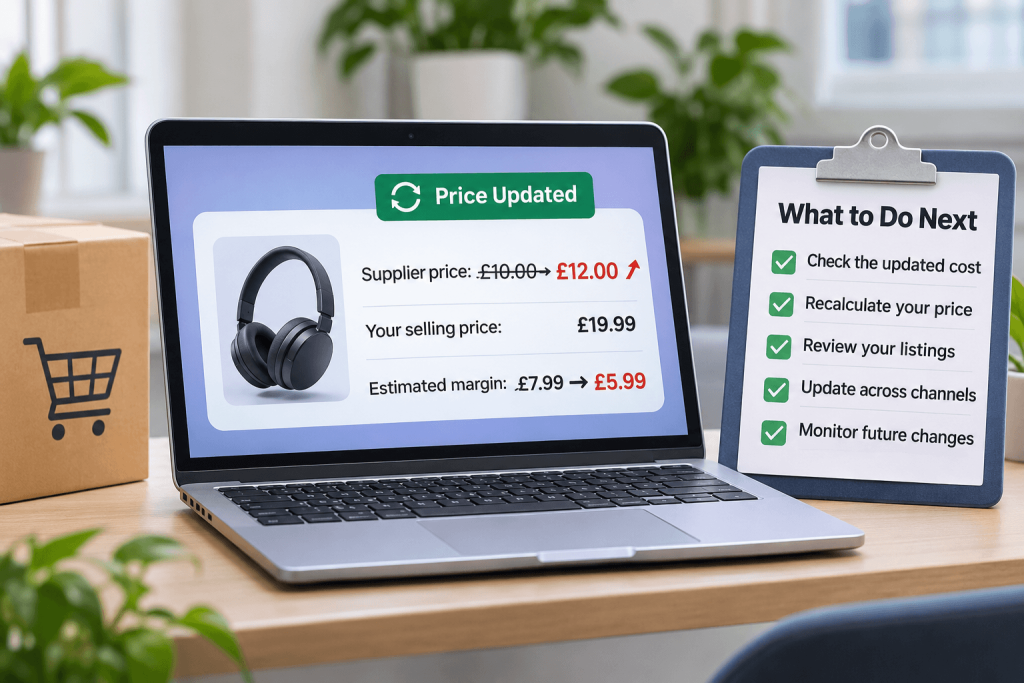
Supplier prices can change for many reasons, from higher manufacturing and shipping costs to changes in availability or seasonal demand. For dropshipping sellers, even a small increase in the wholesale price can affect the amount left after fulfilling an order.
The challenge is that your online listing may still show the original selling price when your supplier updates its cost. If you continue selling at that price without reviewing the numbers, your margin could become smaller than expected. In some cases, an order may no longer be commercially worthwhile.
Knowing how to respond to dropshipping supplier price changes can help you make informed pricing decisions, maintain clearer cost records and reduce the risk of selling products at an unsuitable price. This guide explains the practical steps UK sellers can take when a supplier changes a product or shipping price.
Supplier price changes are not the only challenge dropshipping sellers may face. If a product becomes unavailable after a customer places an order, understanding how to handle dropshipping supplier stockouts can help you manage customer expectations and review your next steps.
Why Do Dropshipping Suppliers Change Their Prices?
Supplier prices are not always fixed. A supplier may review its wholesale prices when its own operating costs or market conditions change. Common reasons include:
- Higher purchasing or manufacturing costs: Raw materials, components, labour and production expenses can become more expensive.
- Changes in shipping costs: Carrier charges, fuel costs, packaging and fulfilment expenses may affect the cost of supplying an item.
- Currency movements: Exchange-rate changes can influence the cost of products sourced internationally.
- Seasonal demand: Demand for certain products may rise during peak shopping periods, leading suppliers to review their prices.
- Supplier promotions ending: A temporary wholesale discount or promotional price may expire, returning the product to its standard cost.
- Product or supplier updates: A revised product specification, replacement model or change in sourcing may result in a different price.
A supplier price change does not automatically mean you must stop selling the product. It does mean you should review the updated cost and decide whether your current selling price remains suitable.
How Can a Supplier Price Increase Affect Your Business?
Your selling price needs to cover more than the supplier’s product cost. Depending on your business and sales channel, you may also need to account for supplier shipping, marketplace fees, payment processing charges, taxes, advertising and other operating costs.
If the supplier increases its price while your retail price stays the same, the amount remaining to cover these costs and contribute towards your business income will fall.
A Simple Example
Imagine you sell a product for £19.99. The supplier initially charges £10 for the product and £2 for shipping. The figures below show how a supplier price increase affects the amount remaining before marketplace fees, payment charges, tax and other costs.
| Cost or Amount | Before Price Change | After Price Change |
|---|---|---|
| Selling price | £19.99 | £19.99 |
| Supplier product cost | £10.00 | £12.00 |
| Supplier shipping | £2.00 | £2.00 |
| Amount remaining before other costs | £7.99 | £5.99 |
In this example, the supplier’s product price increases by £2, reducing the amount remaining by the same amount. The £7.99 and £5.99 figures are not net profit: they do not include marketplace fees, payment charges, VAT or other business costs. The example is illustrative, and your own calculation should use your actual costs and tax treatment.
What Should You Do When a Supplier Changes Their Price?
When you receive a price update, avoid changing your listing immediately without checking the details. Follow a consistent review process instead.
1. Check the Updated Supplier Cost
Confirm the new product price and when it takes effect. Check whether the change applies to every product, a particular variant or only selected SKUs. Also establish whether the supplier has changed its shipping charge, minimum order conditions or any other fulfilment cost.
Keep a record of the previous and updated prices. This makes it easier to understand the effect of the change and check whether the same product has been affected more than once.
2. Recalculate Your Selling Price
Review the full cost of fulfilling an order rather than looking at the product price alone. A useful starting point is:
Amount remaining before tax and other overheads = Selling price − supplier product cost − supplier shipping − applicable variable selling costs.
Include relevant marketplace and payment processing fees in your calculation. Consider your advertising or fulfilment costs where they apply. Make sure you understand whether VAT is included or excluded in each figure and use the correct treatment for your business.
3. Decide Whether to Update the Retail Price
If the revised supplier cost reduces your margin below the level you want to maintain, consider whether the retail price should change. Before updating it, review competitor prices, customer expectations and the product’s position in your catalogue.
A higher retail price may help cover the increased cost, but it could also affect conversion. There is no single price increase that works for every product. Base the decision on your costs, market conditions and pricing strategy.
4. Check Every Relevant Product Listing
If the product is listed on more than one marketplace or online store, check that the correct price is displayed on each connected channel. Pay particular attention to product variants, bundles and listings that use different SKUs.
Do not assume that changing a price in one system means every sales channel has applied the update successfully. Check the live listing where possible and investigate any channel errors or rejected updates.
If you sell across several ecommerce platforms, learning how to sync stock across multiple sales channels can help you manage product availability more consistently and reduce the risk of overselling.
5. Review Existing Orders and Pending Activity
Check whether any orders were placed around the time of the supplier price change. Confirm the supplier’s applicable cost and fulfilment terms for those orders before taking action. If an order cannot be fulfilled on the expected terms, follow your customer communication, cancellation and refund processes and the relevant sales-channel requirements.
6. Monitor Future Changes
Make supplier price reviews part of your regular catalogue checks. Prioritise products with high sales volumes, narrow margins or frequent cost changes. Keeping a simple record of supplier costs, retail prices and review dates can help you identify changes before they become a repeated issue.
For more guidance, read our guide on how to manage your product inventory across multiple sales channels.
How Can Automated Pricing Rules Help?
Reviewing every product manually can become difficult when you manage a large catalogue. Pricing rules can help reduce repetitive work by applying pricing instructions when supplier costs change.
Avasam’s Pricing Rules feature supports rules based on supplier product prices and supplier shipping prices. Depending on the rule and configuration, sellers can use fixed amounts, percentage adjustments or a combination of both. Rules can also be configured for relevant channels, suppliers or product categories.
For example, a seller may set a pricing rule to add a chosen amount or percentage to the supplier cost. A seller may also configure how shipping costs are treated and use a preferred decimal price ending, such as .99. The appropriate setup depends on the seller’s pricing model and the channels being used.
Before relying on a rule, check the current Avasam Pricing Rules guidance and confirm that the relevant sales-channel integration is configured to accept price updates. Avasam can submit price updates, but the sales channel may not always apply them as expected. Check your live listings regularly and be aware that external repricing tools may override prices.
Automated rules can support a pricing process, but they do not remove the need to review costs, fees, taxes and market conditions. Treat them as part of your pricing controls rather than a guarantee that every product will always have the right selling price.
How to Set a Dropshipping Selling Price
A suitable selling price should reflect the full cost of making a sale and the amount you want to retain after variable costs. A practical approach is to:
- Confirm the current supplier product cost.
- Add the supplier shipping or fulfilment charge where applicable.
- Estimate marketplace, payment and other variable selling costs.
- Account for the correct VAT and tax treatment for your business.
- Decide the contribution you want to retain after those costs.
- Compare the resulting price with customer expectations and competing offers.
- Review the price when supplier costs or channel fees change.
Remember that a percentage markup is not the same as a profit margin. For example, adding 20% to a cost does not mean that 20% of the final selling price will remain as margin. Use a calculation that matches the way your business measures profitability.
Common Pricing Mistakes to Avoid
- Updating only the product cost: Supplier shipping, channel fees and other costs can also affect the amount you retain.
- Assuming every channel has updated: Check the actual listing rather than relying only on a submitted update or a successful sync message.
- Using one rule for every product: Different suppliers, categories and channels may need different pricing approaches.
- Ignoring VAT and tax treatment: Make sure your calculations use the correct figures for your business. Seek professional advice if you are unsure.
- Raising prices without checking the market: A price change should consider both your costs and what customers are likely to pay.
- Failing to review external tools: Another repricing application or channel setting may change or override the price you intended to submit.
How Avasam Can Help You Manage Supplier Price Changes
Managing supplier costs across multiple products and sales channels can take time, particularly as your catalogue grows. Avasam connects online sellers with suppliers and supported ecommerce integrations, helping bring product, order and pricing workflows together.
With Avasam Pricing Rules, sellers can configure pricing adjustments based on supplier costs and selected settings. This can help make routine price management more consistent, while regular checks remain important to confirm that channel listings reflect the intended prices.
If you are reviewing your dropshipping setup, you can explore the UK dropshipping suppliers available through Avasam, review the supported integrations and compare the available plans to understand which options fit your business requirements.
Frequently Asked Questions
Why has my dropshipping supplier increased its prices?
A supplier may increase prices because of higher manufacturing, purchasing, shipping or operating costs. Currency movements, seasonal demand and the end of a wholesale promotion can also affect supplier prices.
Should I increase my retail price when my supplier increases its price?
Not automatically. First, recalculate the full cost of fulfilling an order, including shipping and relevant selling fees. Then consider your target contribution, competitor prices and customer expectations before deciding whether to update the retail price.
Can dropshipping pricing rules update product prices automatically?
Pricing rules can help apply configured adjustments when supplier product or shipping costs change. The result depends on your rule settings and channel configuration. Check the relevant integration settings and verify the live listing after an update.
What costs should I include when calculating a dropshipping selling price?
Start with the supplier product cost and shipping. Then consider marketplace fees, payment processing charges, advertising or other variable costs, and the correct VAT or tax treatment for your business. Your calculation should reflect the costs that apply to each sale.
How often should I review supplier prices?
There is no single review frequency that suits every catalogue. Check supplier updates when they are received and schedule regular reviews for products with high sales volumes, narrow margins or frequent cost changes.
Final Thoughts
Supplier price changes are a normal part of running a dropshipping business, but they should never be ignored. A small increase in product or shipping costs can reduce the amount you retain from each order if your retail price remains unchanged.
By checking supplier updates, recalculating the full cost of a sale, reviewing listings across your channels and using pricing rules carefully, you can make more informed decisions about your catalogue. Keep monitoring your costs and live prices so your selling strategy continues to reflect the way your business operates.

DropShip products from verified suppliers to diversify your inventory and scale your eCommerce business